Chargement de la page…

Only compare pre-tax (ex-VAT) amounts if your situation and the transaction genuinely allow you to deduct VAT, backed by a compliant document. Otherwise, the VAT borne may be part of the cost. Always keep the ex-VAT price, the VAT amount, the incl-VAT price, the currency, the country, the transaction type, and the source invoice. Never mechanically strip out a VAT amount shown on a catalog: the right to deduct depends on the seller's regime, the use of the goods, when VAT becomes chargeable, and other conditions. For Amazon selling, bring revenue and costs onto a consistent base validated by your accountant. Any uncertain tax data should block the net margin calculation, not be replaced by an assumed rate.
Ex-VAT and incl-VAT describe amounts, not a tax right
The ex-VAT (pre-tax) price is a base before the indicated tax. The incl-VAT (tax-inclusive) price includes the invoiced tax. But "recoverable VAT" describes a legal and accounting consequence that depends on the situation. Two businesses buying the same product at the same incl-VAT price can therefore have different economic costs.
The European Commission notes that the VAT Directive sets the European framework, which is then transposed and applied by member states. The French tax administration states that, for eligible businesses, deduction requires in particular a supporting document and an allocation to transactions that carry the right to deduct. It also states that a business under the VAT exemption scheme ("franchise en base") does not deduct VAT on its purchases, under the conditions set out on its official page.
These rules cannot be reduced to a universal box that says "company = ex-VAT." The country, the regime, the supplier, the type of purchase, the invoice, the use, and the period all matter. This article organizes the evidence; it does not replace tailored tax advice.
Fields to keep before any comparison
| Field | Example value | Check |
|---|---|---|
| ex-VAT price | provided or calculated amount | method and rounding documented |
| VAT charged | amount and rate shown | invoice and country confirmed |
| incl-VAT price | total due | ex-VAT + tax reconciliation |
| seller's regime | validated status | validation date and source |
| transaction type | domestic, intra-EU, import, or other | treatment confirmed |
| supporting document | invoice, import document, or required document | details and holder verified |
| right to deduct | yes, no, partial, or to confirm | accounting decision, never automatic deduction |
| analysis base | tax-consistent cost | same logic for revenue and costs |
The "ex-VAT" tag in a CSV is not an invoice. The catalog is for simulation, while the supporting document and actual treatment are for accounting. Keep these two states separate.
A four-step decision procedure
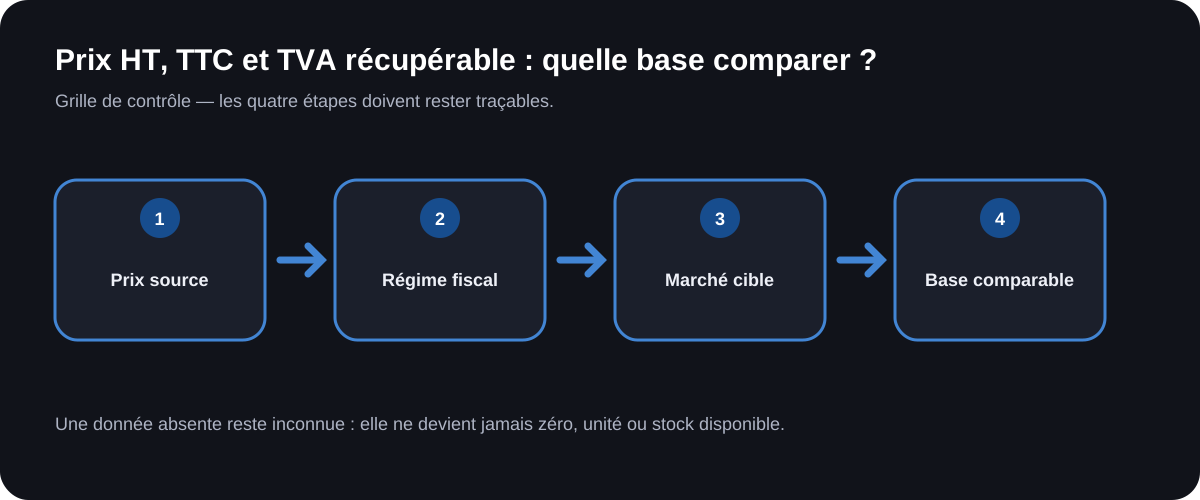
1. Identify the seller and the transaction
Record the supplier's country, the customer's country, the delivery location, the account holder, and the nature of the goods. Do not infer the treatment from a domain suffix. A marketplace can connect several entities and logistics flows.
2. Verify the regime and supporting documents
Confirm with your accountant whether the business is liable for VAT, whether the purchase carries the right to deduct, and which document is required. In France, the official tax authority page details conditions and exclusions. VAT wrongly charged is not automatically deductible.
3. Build the two readings
Keep the cash-flow reading — what will actually be paid — and the validated economic reading — what remains as a cost after the tax treatment. If the right is uncertain, use the incl-VAT cost in a cautious scenario or mark the result as not calculable under the rule the business has chosen. Do not present the ex-VAT scenario as the truth.
4. Reconcile after the invoice and the return
Replace the catalog figures with the invoice, attach credit notes, imports, and adjustments, then check the deduction actually applied. The gap between the simulation and the accounts improves future calculations without rewriting the original evidence.
Useful formulas, only with a confirmed rate
If a valid invoice gives a rate t and an ex-VAT price H, then:
Incl-VAT = H × (1 + t)
and the tax amount is:
VAT = H × t.
If only the incl-VAT amount C is known, and if the applicable rate is confirmed by the document and the context:
Ex-VAT = C / (1 + t).
These formulas are arithmetic. They prove neither the correct rate nor the right to deduct. Do not use an assumed standard value. If the invoice includes several rates or lines, calculate line by line.
Purely hypothetical example: a fictional invoice shows directly 100 monetary units ex-VAT and 10 units of tax, i.e. 110 incl-VAT. For a business whose accountant confirms full deduction on this transaction, the economic scenario can use 100. For a business with no right to deduct, it can use 110. The numbers represent no actual tax rate; they only illustrate the gap between two situations.
Aligning the base for Amazon fees
The Amazon commission by category must be calculated on the base defined by the official fee schedule. Do not transform this base to make it look like your purchase cost. Calculate the fee according to its own rule, then bring the results onto the validated analysis base.
In the full landed cost on Amazon, each line should indicate whether the tax is included, deductible, non-deductible, or undetermined. An undetermined tax is worth neither zero nor a certain cost. It produces an alert and possibly a range.
The currency spread and payment fees remain yet another topic. A debit in foreign currency can include a conversion without changing the invoice's tax treatment. Do not merge tax, spread, and commission under "miscellaneous fees."
Cases that require professional validation
An intra-EU acquisition, an import, a foreign invoice, a VAT exemption regime, mixed-use activity, a partly business expense, or an incomplete document all warrant a review. Rules can differ by country and can change. Ask your accountant or the relevant authority to confirm before deciding that VAT falls outside the cost.
Also avoid claims about the future sale. European directive 98/6 defines the selling price in the context of indicating prices to consumers with applicable taxes. This display rule does not by itself determine the base of your internal indicator or the regime of the Amazon transaction.
What ArbitragePro+ can automate / what the seller must verify
The selecteur-regime-prix function is a proposed specification, not a confirmed feature. It could keep the ex-VAT price, the VAT, and the incl-VAT price, require a source for the regime, produce several scenarios, and prevent a net margin calculation when the treatment remains undetermined. It should version any configured tax rule.
The seller must confirm their regime, the transaction, the supporting document, the right to deduct, and the accounting treatment with a qualified professional. They also check invoices and credit notes. The tool cannot infer a tax right from a simple catalog field.
Checklist before comparing
- Ex-VAT price, tax, and incl-VAT price are kept separately.
- The country and transaction type are identified.
- The seller's regime is confirmed and dated.
- The supporting document belongs to the right entity.
- The right to deduct is never assumed.
- Lines with several rates are handled separately.
- Revenue and costs use a consistent base.
- The Amazon calculation respects its own fee base.
- Tax uncertainty blocks the net conclusion.
Official sources
- European Commission, VAT Directive and scope: https://taxation-customs.ec.europa.eu/taxation/vat/vat-directive_en — accessed 2026-08-17.
- Direction générale des Finances publiques, "How do I deduct VAT on my purchases?": https://www.impots.gouv.fr/professionnel/questions/comment-deduire-la-tva-sur-mes-achats — accessed 2026-08-17.
- EUR-Lex, Directive 98/6/EC on price indication: https://eur-lex.europa.eu/legal-content/FR/TXT/?uri=CELEX%3A01998L0006-20220528 — accessed 2026-08-17.