Chargement de la page…
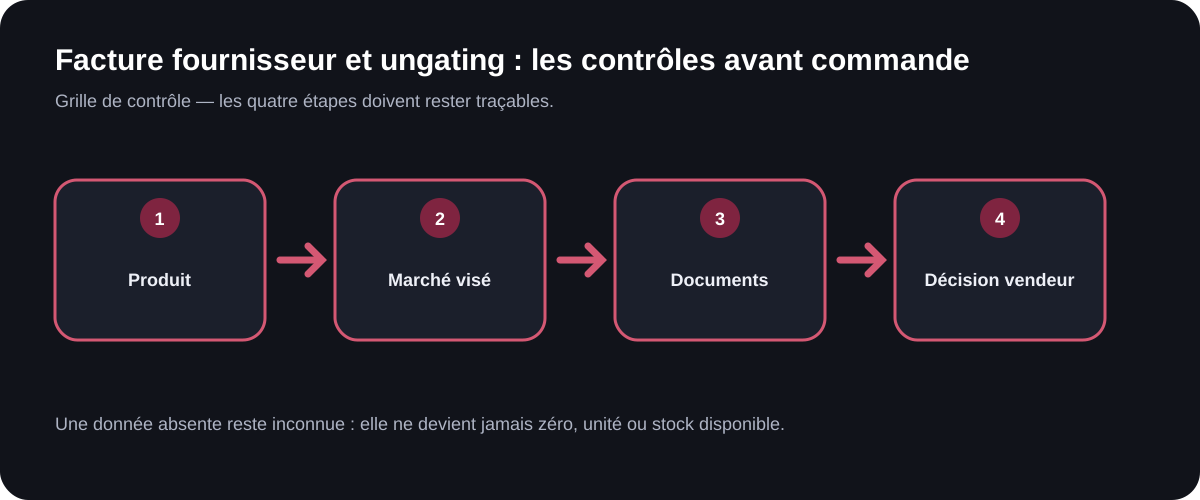
Before ordering in order to request Amazon approval, open the relevant flow with your account and note the documents required at that moment. Then verify that the supplier can issue an authentic, legible invoice consistent with the account's legal identity, the products, the quantities, and the requested details. Do not rely on an old checklist or a threshold found on a forum: requirements can depend on the ASIN, the brand, the category, the marketplace, and the seller. A tax-compliant invoice does not guarantee Amazon's acceptance, and an accepted invoice alone does not prove the product's compliance.
Start from the current request, not a universal recipe
Amazon documents that certain restrictions may require approval. The Listings Restrictions API can return the reasons and, when a step is available, links allowing the seller to continue the request. It is this contextualized flow that should guide file preparation.
Avoid fixed rules like "this quantity is always enough" or "any invoice less than this old is accepted." The official public sources consulted do not support these criteria for every request. Instead, record the text shown in the account, the date, the ASIN, the marketplace, the condition, and the case identifier.
The method for checking brand restrictions before buying should be run first. If no approval path is offered, or if the product remains ineligible, buying while hoping for a later change needlessly exposes your cash.
Two independent validations
An invoice can be checked from two different angles.
| Angle | Question | Source of truth | Limit |
|---|---|---|---|
| Tax and commercial | does the document describe the transaction per applicable rules? | national rules and the VAT framework | does not guarantee ungating |
| Amazon | does the document meet the request shown for this case? | Seller Central flow or official link | does not replace product compliance |
The European Commission summarizes the information required on a complete VAT invoice, including the issue date, sequential number, identity and address of the parties, description and quantity of the goods, unit price excluding tax, and the VAT rate and amount as applicable. National rules or special regimes can modify the treatment. This framework helps detect an incomplete document; it does not describe Amazon's documentation policy.
Examining the invoice without altering it
Keep the original file received from the supplier. Never edit a name, date, quantity, or address to artificially bring the document closer to matching the account. If information is wrong, request an official correction or a credit note through the supplier's process.
Check at minimum:
1. the supplier's legal identity and contact details; 2. the buyer's identity and its consistency with the seller account; 3. the document number and date; 4. the description, reference, and quantity of the products; 5. the currency, prices, and presentation of applicable VAT; 6. the legibility of every page; 7. consistency with the order, payment, and receipt; 8. any specific elements explicitly requested in the Amazon case.
An overly vague internal reference can make it impossible to link the line item to the product. Before buying, ask the supplier how the invoice will identify the brand, model, or variant. Do not assume an EAN visible in the catalog will automatically appear on the invoice.
Verifying the supplier and the supply chain
An invoice is one piece of the file, not a full investigation. Verify the company's legal existence via the relevant official registers, the consistency of its contact details, its right to distribute the products when authorization is required, and the traceability available. Avoid claiming "authorized distributor" without proof from the rights holder.
Before paying, ask whether the supplier accepts having its details verified and whether it can provide legitimate commercial documents matching the transaction. A refusal, an inconsistent address, or a promise of a "guaranteed Amazon invoice" should trigger a thorough review.
For VAT, the article on the ex-VAT base, incl-VAT price, and recoverable VAT is a reminder that the treatment depends on the transaction and the seller's regime. Do not turn a tax-inclusive amount into an ex-VAT cost through an automatic division without applicable tax proof.
Preparing a file before committing funds
Create a pre-order file with four states: "restriction verified," "requirements captured," "supplier documented," and "invoice predictable." The last one means the supplier has confirmed the format it normally issues, not that the future document will be accepted.
Procedure:
1. Precisely identify the ASIN, brand, category, and marketplace. 2. Launch the eligibility check in the seller account. 3. Archive the requirements and the official next-step link. 4. Compare these requirements against the supplier's legitimate invoice template, without asking for any falsification. 5. Verify the company and the business relationship. 6. Assess compliance, product restrictions, and the logistics program separately. 7. Order only if the documentation risk is accepted. 8. On receipt, reconcile the invoice, goods, and payment before submission.
The final Seller Central checklist should remain the last check. An approval in progress is not an approval obtained.
Handling a rejection without fabricating evidence
If Amazon rejects a document, keep the reason and follow only the steps proposed. Do not crop the invoice to hide information, do not combine documents without disclosing it, and do not request a false description. Ask the supplier for a correction only if the commercial invoice was genuinely wrong.
A rejection can reveal an incompatibility between the product, the supplier, and the request. In that case, the right outcome of the check is sometimes to walk away from the source. An opportunity not bought avoids stock that gets stuck.
Checklist for the invoice file
- The restriction is verified for the account, ASIN, and marketplace.
- Current requirements are archived with their date.
- The supplier exists and its details match.
- The expected document is a real invoice for the transaction.
- The buyer matches the account's legal identity.
- Products, variants, and quantities will be identifiable.
- VAT and currency are not interpreted without proof.
- The original file remains intact and legible.
- Authenticity, compliance, and ungating carry separate verdicts.
- No purchase is based on an assumed approval.
What ArbitragePro+ can automate / what the seller must verify
The proposed specification checklist-facture could prepare the file fields, flag visible inconsistencies, and link the invoice to the order without altering the document. It should mark Amazon's requirements as dated observations, never as universal rules.
The seller must consult their account, verify the supplier, assess tax validity with a qualified professional if needed, submit genuine documents, and await Amazon's decision.
Official sources
- Amazon Selling Partner API, "Listings Restrictions API," https://developer-docs.amazon.com/sp-api/lang-fr_FR/docs/listings-restrictions-api — accessed 2026-08-17.
- Amazon France, "Product compliance," https://sell.amazon.fr/solutions-conformite/produit — accessed 2026-08-17.
- European Commission, "VAT Invoicing," https://taxation-customs.ec.europa.eu/taxation/vat/vat-businesses/invoicing_en — accessed 2026-08-17.
Check the cost and the evidence
Open the ArbitragePro+ analysis to gather product information and assumptions before ordering.